



Deep Freeze can manage Windows Updates on protected workstations, applying them during scheduled maintenance tasks so the updates are retained in the baseline. Which updates are applied depends on the Windows Update categories selected in the Configuration Administrator.
In Deep Freeze 10.20, that selection changes. Below, we look at how categories are selected today, why the current options can result in updates being skipped on Windows 10 and 11 systems, and what the configuration looks like in the new release.
How Windows Update Categories Are Selected Today
In Deep Freeze 10.10 and earlier, selecting the Microsoft Windows Update service presents three options, and one must be chosen:
- Security & Critical Updates: Retrieves updates classified as Security or Critical only.
- Security, Critical & Feature Updates: Retrieves Security and Critical updates, and additionally applies Feature Updates.
- All Updates: Retrieves all categories available to Deep Freeze at the time of the release.
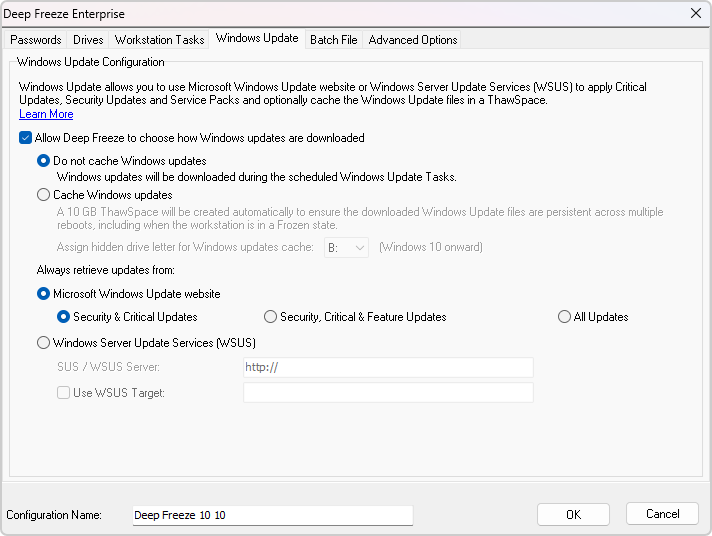
BEFORE: Windows Update tab, Deep Freeze 10.10: the three category options under “Microsoft Windows Update website”
Why the Current Options Can Skip Updates on Windows 10 and 11
Two factors combine here, and the first is the more important one. Windows updates are not independent of one another. A Security or Critical update frequently requires an update from a different category to be installed first as a prerequisite. Because Deep Freeze was retrieving only Security and Critical updates, those prerequisites were never installed, and the updates that depended on them could not be applied. The workstation reports little or nothing available while falling steadily further behind.
The Security and Critical classifications date back to Windows 7. Microsoft has since introduced additional update categories for Windows 10 and 11, including quality updates, monthly cumulative updates, servicing stack updates, and update stack packages. These are not classified as Security or Critical.
As a result, when Security & Critical Updates is selected, the update search returns few results on a current Windows 10 or 11 system. The monthly cumulative update that contains that month’s fixes may not be retrieved at all. Because cumulative updates are frequently prerequisites for later updates, affected workstations can fall progressively further behind, and workstations managed by Deep Freeze may receive different updates than workstations that are not.
Selecting Security, Critical & Feature Updates carries the same limitation and also applies feature updates. Organizations that intend to remain on their current Windows release and evaluate the next one on a smaller group first have no option that retrieves everything except the feature update. Because Deep Freeze controls the Windows Update settings on the workstation, deferrals configured outside Deep Freeze are reset.
What Changes in Deep Freeze 10.20
In Deep Freeze 10.20, selecting Microsoft Windows Update service retrieves all Software Updates by default. No category selection is required.
Three opt-in checkboxes control the exceptions:
- Include Feature Updates: Applies major Windows version upgrades, such as 24H2 to 25H2. Disabled by default.
- Include Driver Updates: New in 10.20. Applies hardware drivers delivered through Windows Update that can be installed without user interaction. No previous release of Deep Freeze applied driver updates. Disabled by default.
- Include Microsoft Product Updates: New in 10.20, added in response to customer requests. Applies updates for Office, OneDrive and other Microsoft products delivered through Microsoft Update. Disabled by default.
The Security & Critical Updates option has been removed. It was designed for older Windows systems and resulted in updates being skipped on Windows 10 and 11.
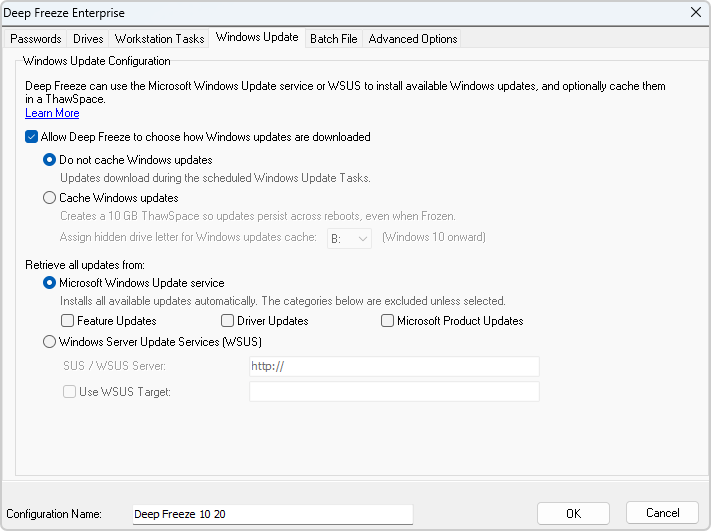
AFTER: Windows Update tab, Deep Freeze 10.20: with the Include Feature Updates, Include Driver Updates and Include Microsoft Product Updates checkboxes.
A default 10.20 configuration therefore retrieves security updates, quality updates, monthly cumulative updates, servicing stack updates, update stack packages, out-of-band updates and definition updates, while leaving the Windows feature release unchanged until Include Feature Updates is enabled.
How Existing Configurations Are Handled
Existing configurations do not need to be rebuilt. Settings are mapped forward when the workstation is upgraded:
| Setting in Deep Freeze 10.10 and earlier | Behavior in Deep Freeze 10.20 |
|---|---|
| Security & Critical Updates | All Software Updates |
| Security, Critical & Feature Updates | All Software Updates, with Include Feature Updates enabled |
| All Updates | All Software Updates, with Include Feature Updates enabled |
Two points are worth noting before upgrading:
- Allow for a longer first maintenance window: Workstations previously configured for Security & Critical Updates may have a backlog of updates that were not being retrieved. These will be applied during the first Windows Update task after the upgrade. Select “When Windows Update completes” when scheduling the Windows Update workstation task to ensure the task completes.
- Nothing is being taken away: Driver Updates and Microsoft Product Updates were never applied by any previous version of Deep Freeze. They are new capabilities in 10.20, not categories being removed from an existing configuration.
For deployments that use the Configuration Generator, the Windows Update tags in the CSV file have been extended to cover the new options. The new tags are documented in the Deep Freeze Enterprise User Guide, and Technical Support can help review existing deployment scripts if needed.
Phased Availability of Deep Freeze 10.20
Deep Freeze 10.20 is being made available in phases, with accounts enabled on a rolling basis.
If you would like it sooner, contact Faronics Technical Support, and we will provide access.
FAQs
Will the New Default Install Feature Updates Automatically?
No. Feature updates are excluded unless Include Feature Updates is enabled. Workstations remain on their current Windows release while continuing to receive security, quality, and cumulative updates.
Why Was the Security & Critical Updates Option Removed?
The option was built around update classifications used by older Windows systems. On Windows 10 and 11, most updates are not classified as Security or Critical, so the option resulted in updates being skipped.
What Happens to a Configuration Currently Set to All Updates?
It is mapped to all Software Updates with Include Feature Updates enabled, which preserves the behavior of the previous setting.
Do Workstations Need to Be Reconfigured After Upgrading?
No. Existing settings are mapped forward automatically. Reconfiguration is only required if the new opt-in categories are needed.
How Can the New Version Be Obtained Sooner?
Contact Faronics Technical Support, and we will provide access.





 your Deep Freeze license count and free for up to 3 years