


- Deep Freeze Cloud
- Faronics Labs
- Faronics Deploy
Windows Updates
Simplify Windows update management with centralized control and automated delivery.
Request a Demo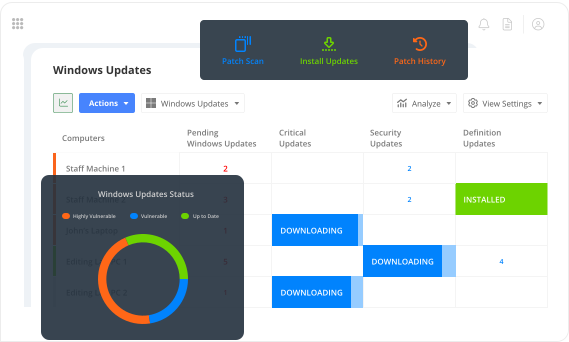

Auto-Approve or Defer
Let safe updates roll out automatically while holding back others for validation.
- Auto-approve categories like Security and Critical Updates.
- Defer rollout of Feature Updates to reduce risk.
- Choose manual review for updates with known stability issues.
- Set defer periods—e.g., wait 7 days before applying new updates.
Smart Patch Control
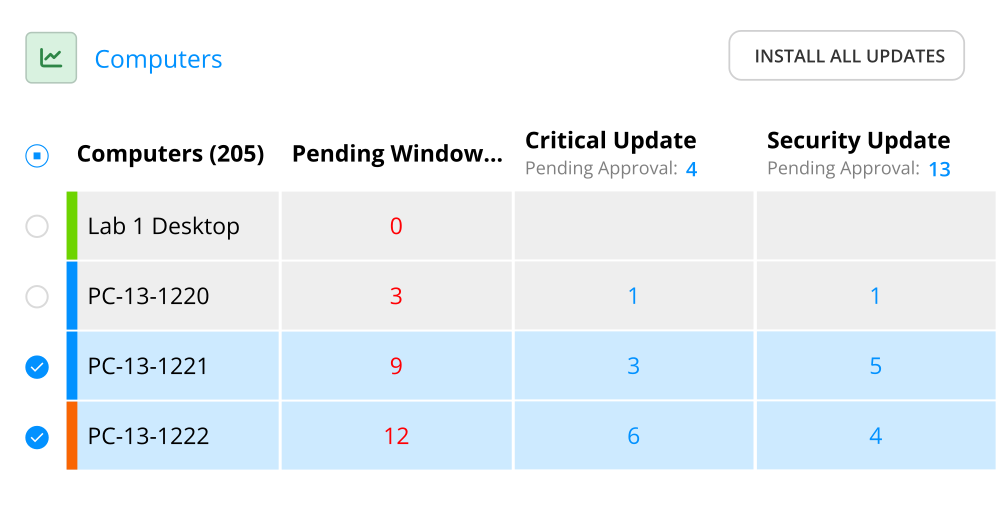
A real-time grid interface lets you drill into update status by machine, update type, or KB.
- Filter systems by missing, failed, or pending updates.
- Approve or deny updates with a single click.
- Approve, defer or deny updates individually or in bulk.
- Review installation outcomes and retry failures instantly.

Real-Time Patch Dashboard
Use the Deploy Dashboard to track patch status across all systems.
- View patch compliance at a glance with widgets showing up-to-date vs out-of-date machines.
- Identify risk exposure with “Vulnerable” and “Highly Vulnerable” device counts based on missing security updates.
- Monitor device communication status with the “Last Reported” widget to distinguish stale systems from non-compliant ones.
- Cross-reference update gaps with device check-ins to isolate network or policy issues instantly.

Patch Intelligence on Your Schedule
Run scan cycles daily, weekly, or on-demand—ensuring your view of patch status is always current.
- Set recurring patch scans by policy.
- Launch scans on selected endpoints in real time.

Intelligent Update Delivery
Windows updates are retrieved using an agent-driven model optimized for bandwidth and availability.
- Machines can download updates directly from Microsoft—no VPN or on-prem network required.
- Optionally pre-download approved updates to apply them instantly during scheduled maintenance periods.
- Designate any machine as a cache server to locally store update packages and serve them to peers on the same network.
- If no cache is found, devices fall back to Microsoft—ensuring updates reach their target without added admin effort.

Deploy has completely changed my world. The first time I pushed out an update for our secure browser, there was nothing to it. 5 minutes later all 1,400 student computers had the update.
Nick Steenberg
District Technician, Wheatland School District

Our IT department is a lot more efficient, we have a more secure environment and managing updates in a timely way is a lot easier thanks to Deploy and Deep Freeze.
Matt Beckstrom
Systems Manager, Lewis & Clark Library

Deploy became invaluable to us during the pandemic because we were able to quickly onboard all our staff PCs.
Laura Nawrocik
Head of Information Technology, Mercer County Library, Central New Jersey

In the past, I would have to manually go to every computer to keep it up to date. Right now, it’s just me. I’m a one-man show. Faronics was that “second person,” that helps me maintain control over my fleet automatically. It’s saved loads of time.
Parker Reed
IT Administrator, Allied Dispatch Solutions
Get Started Today
Lightning-fast deployment for apps, windows updates, and OS—done in minutes.
Request a DemoFAQs
- Yes. You can approve, deny, or defer updates by type—Feature, Security, Driver, and more—using per-group policies.
- Endpoints fetch updates directly from Microsoft, with no VPN or central server required. To optimize bandwidth, updates can be pre-downloaded or pulled from a local cache server. If unavailable, the agent automatically falls back to Microsoft.
- Absolutely. You can defer Feature Updates or any other update category for up to 365 days.
- No. Deploy works independently of WSUS but can integrate with it if your environment requires hybrid control.
- Yes. Each group can follow its own update policy. You can automate one department while manually approving updates for another.
- You control that. Set whether updates occur silently, prompt for restart, or defer reboot until the next window.
- While Windows handles patch rollback itself, Deploy flags failed installs immediately and helps you take next steps per endpoint.
- Yes. You can view a full audit of installed and missing patches per machine, with status and timestamps.

We're here to help you in any way possible.


 your Deep Freeze license count and free for up to 3 years