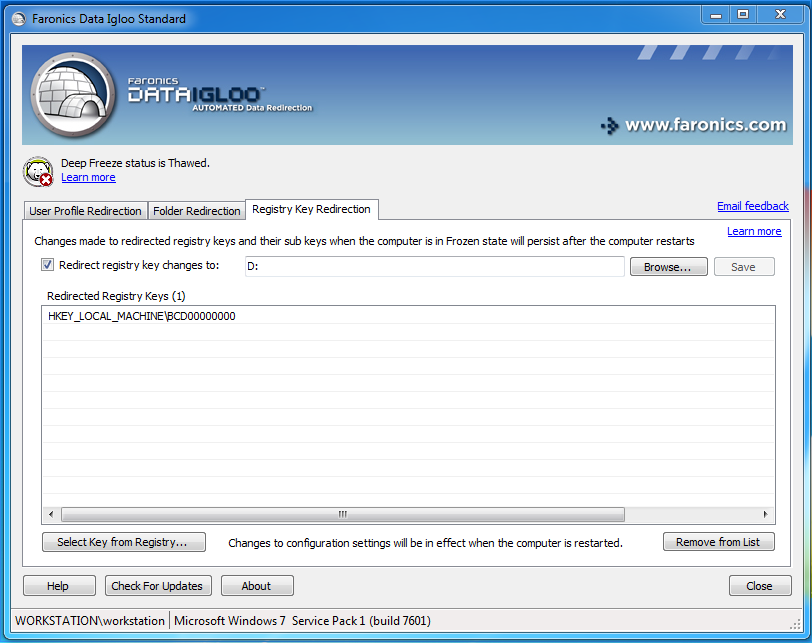
Creating a Registry Key Redirection Complete the following steps to create a Registry Key Redirection: 1. Ensure the Deep Freeze status is Thawed. 2. Go to Registry Key Redirection tab. Select Redirect registry key changes to: checkbox. 3. Click Browse to select a location on a Thawed drive. 4. Click Select Key from registry.... 5. In the Browse For Registry Key dialog, select the registry key and click Redirect. 6. The registry key is redirected to the Thawed drive. 7. Reboot the computer Frozen. Changes made to the configuration are applied only when the computer restarted. Registry key redirection takes effect only when the computer is rebooted Frozen. Select the specific registry key to be redirected. Selecting the parent registry key removes the child registry key from the list. Deep Freeze status must be Thawed to change the settings in the Registry Key Redirection tab. Registry key redirection can also be enabled when the Deep Freeze status is Frozen. However, registry key redirection will not take effect when the computer is rebooted. The registry keys that are grayed out cannot be redirected. Some Registry Keys might automatically appear in the Registry Key Redirection tab. These Registry Keys are used by Data Igloo and cannot be removed manually.